From your first email to proof of delivery, I use Freight Command Center to organize the details, reduce repetitive work and keep your shipment moving through a clear process. You work directly with me, Jay Rock, through UCW Logistics.
Freight Command Center (FCC) is not a UCW Logistics product. It is software I developed to streamline the freight business from quote to delivery.
The big picture
One load. One timeline. Clear next steps.
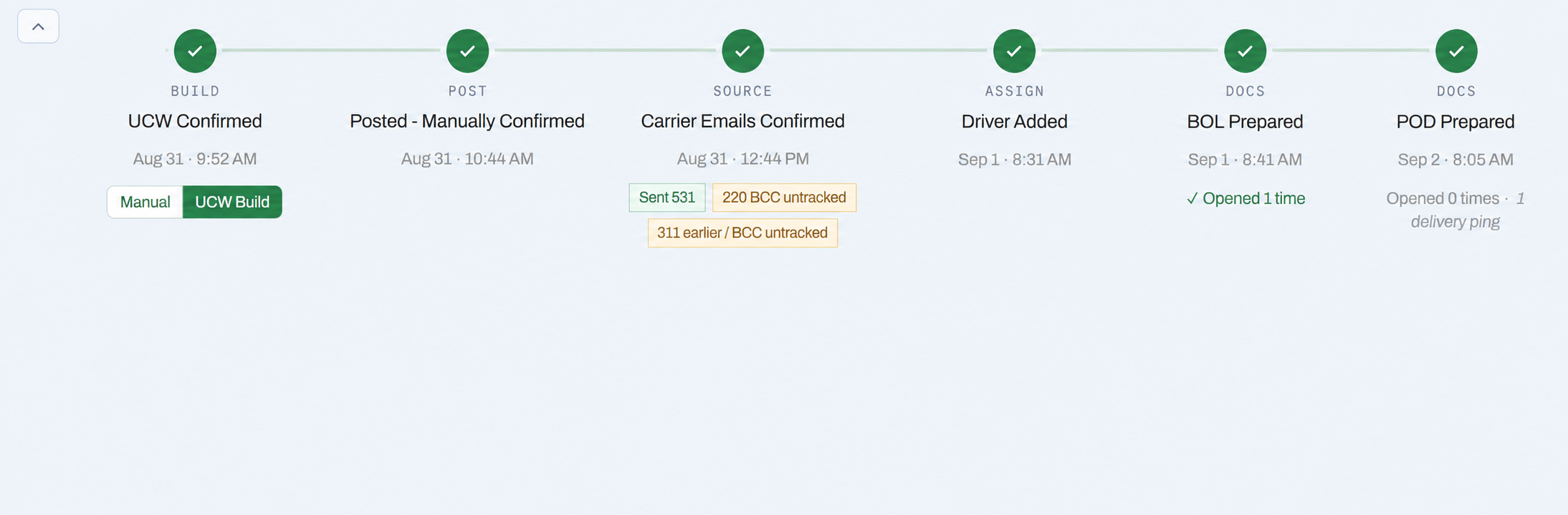
The load record stays with the shipment as it moves from preparation through carrier assignment, documents and closeout. I can see what has been completed and what still needs attention.
Build
Post
Source
Assign
BOL
POD & closeout
On a small screen, swipe the timeline sideways for a closer look.
A privacy-safe detail from my working FCC screen. These are administrative milestones, not live GPS positions. A document marked prepared is not the same as a document received by the customer.
How the process works
Speed matters. So does what happens next: reviewing the details, screening the carrier, communicating clearly and following through on the paperwork. Here is how I connect those steps.
The manual-workflow examples describe tasks FCC helps me reduce; they are not claims about every broker. Timings are my own workflow observations, not independent benchmarks. Results vary with the shipment, data quality, connections and required review. Faster administration does not guarantee a lower rate, available capacity or earlier delivery.
Steps 01–03
Prepare the load
Turn shipment information into a reviewed load, with market-rate context and less repeat entry.
01
Turn your email into a structured shipment
My observed timing 1–2 seconds for email-text conversion in my observed workflow; review time is separate.
With FCC
I bring the shipment email into FCC, which converts the text into organized load fields. I review the result and resolve missing or conflicting details before moving forward.
Manual workflow
Read the email, copy the details and type them into a separate load record, field by field.
What you getLess repeated entry, with the important shipment details in one place from the start.
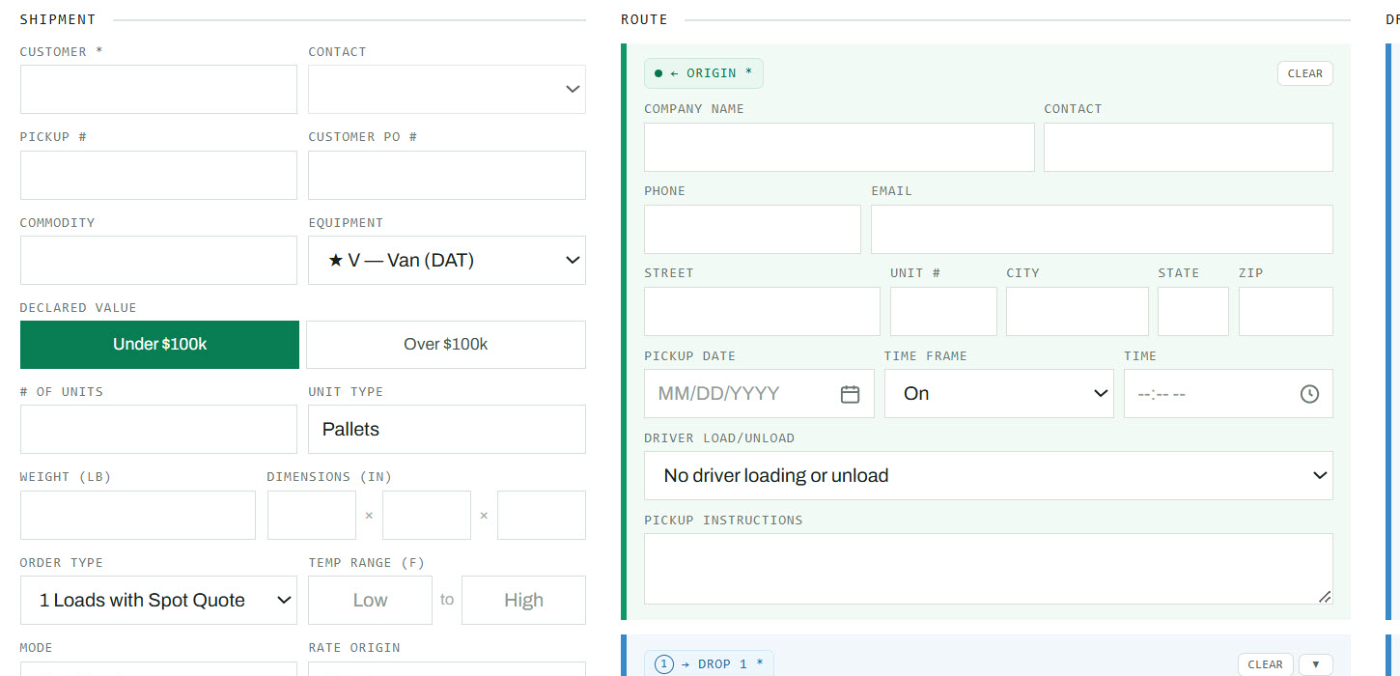
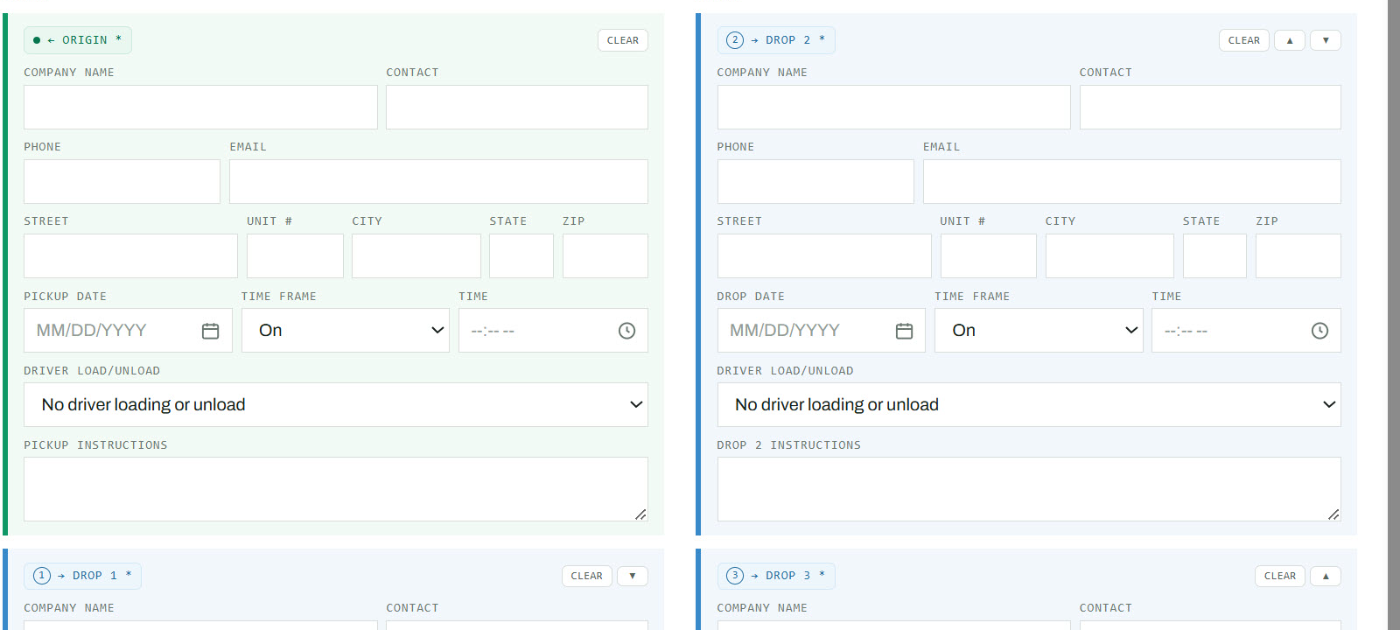
The structured shipment fields in FCC. This blank-form example shows where details are organized; it does not demonstrate or time the conversion itself.Each stop has its own appointment window and instructions, keeping multi-stop requirements together.02
Check current market-rate context
With FCC
One click from my workflow opens DAT for a rate check. I use that market context alongside your equipment, lane, timing and service requirements when preparing a quote.
Manual workflow
Switch systems, enter the lane information again and look up comparable rates.
What you getA more organized pricing conversation, informed by market data—not a promise that an estimate is a bookable rate.
My observed timing Under 40 seconds to open and populate the UCW posting workflow in my observed use; approval and carrier coverage are separate.
With FCC
Once the shipment details are approved, one click opens UCW's posting system and a second populates the load information from FCC. FCC flags possible inconsistencies so I can review and correct them before submission.
Manual workflow
Re-enter the shipment into the brokerage's posting system and compare the fields against the original request.
What you getLess duplicate entry and a deliberate review before your load is presented to carriers.
My UCW workflow provides posting access across 14 load boards. That is more places to present the load—not a guarantee of carrier response or coverage.
Load-board count reflects Jay's current description of his UCW workflow; it is not an independently verified market comparison.
Steps 04–06
Find and assign a carrier
Bring carrier screening, targeted outreach and assignment into the same organized workflow.
04
Screen the carrier before assignment
My observed timing 3–5 seconds to return screening information in my observed workflow; final review and approval are separate.
With FCC
I enter the carrier's MC number to bring Highway-sourced screening information and UCW connection status into my workflow. Pass, partial-pass and fail indicators help identify what needs attention. A partial result requires review; a failed result is not approval to use the carrier.
Manual workflow
Open the screening service, search for the carrier and reconcile the findings with the brokerage's carrier records.
What you getScreening information is part of the assignment decision, not something left in another tab. Current requirements still have to be checked.
A screening result is not a safety guarantee or a substitute for UCW's carrier-approval requirements.
Reach relevant carriers with a complete load email
With FCC
My carrier contact lists are already organized by equipment and pickup area. With a few selections, FCC prepares a consistently formatted load email for the relevant group, ready for my review and sending.
Manual workflow
Request or export a list, sort for the pickup area and equipment, reconcile repeated contacts, then compose and format the load email.
What you getRelevant shipment information can get in front of carrier contacts with less list preparation and message rewriting.
A saved contact is not proof of current availability or carrier approval. Screening remains a separate step.
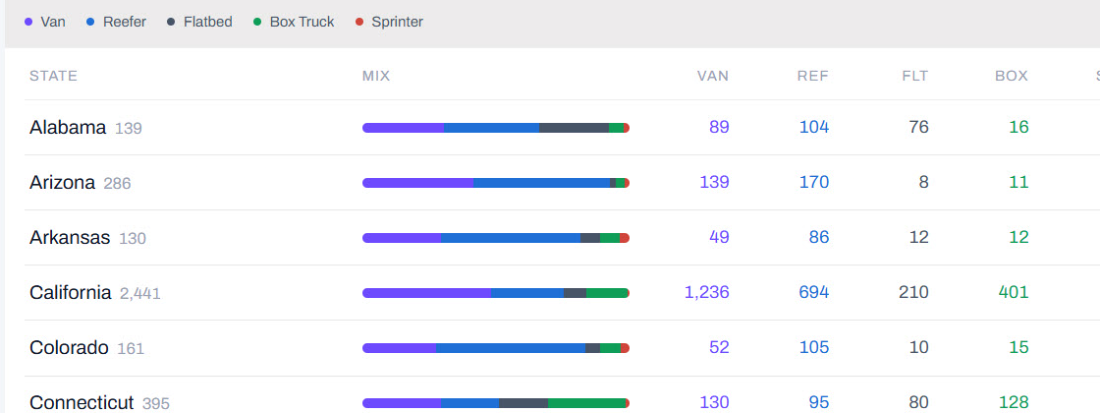
Existing outreach contacts organized by equipment. These totals are contact records, not available or pre-approved trucks.State-by-state equipment groupings help focus outreach around the pickup area.06
Connect the approved carrier to the load
With FCC
After the carrier is approved and the terms are confirmed, one click adds the carrier to the load. Carrier, driver and shipment details stay together for the next document and communication steps.
Manual workflow
Return to the load system, enter the carrier information again and reconcile the related contact details and emails.
What you getA clearer handoff from carrier selection to shipment coordination, with less copying between records.
FCC's coverage filters help me distinguish loads still needing a carrier from those marked covered. Status is maintained in the workflow; it is not live location tracking.
Steps 07–10
Communicate through delivery
Keep documents, tracking, exceptions and proof of delivery connected to the load.
07
Send organized shipment documents and details
With FCC
With one click, FCC prepares a detailed shipment email from the load record. I review the message, include the bill of lading (BOL) and appropriate driver contact information, and send it to the customer.
Manual workflow
Assemble the documents, write a new email and copy shipment and driver details into the message.
What you getConsistent, readable communication with the documents and contact details needed to coordinate the shipment.
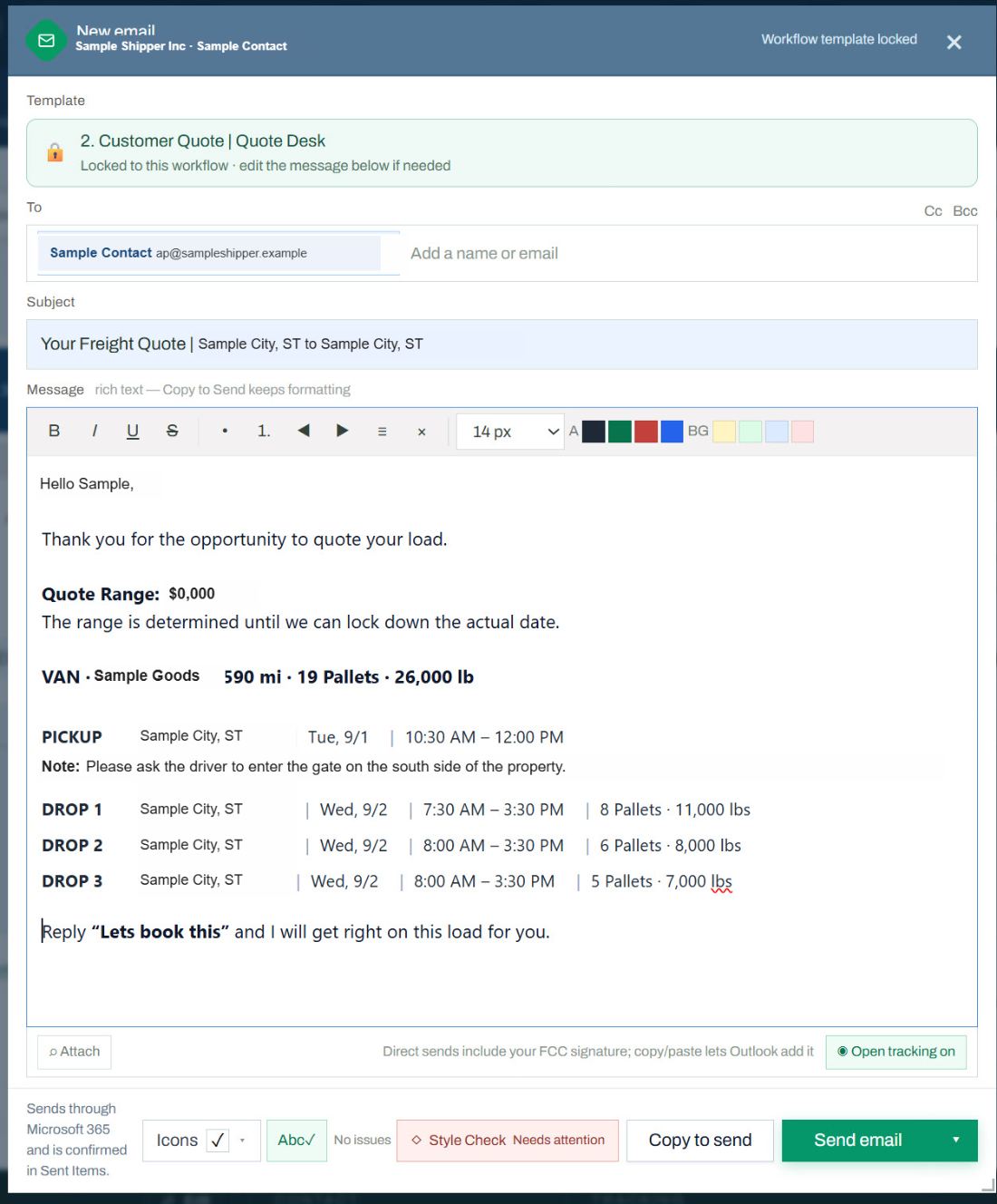
A customer-quote email example with fictional data, illustrating FCC's populated-message format. A shipment/BOL-specific screenshot can be added here next.08
Share tracking through Trucker Tools
With FCC
As part of my UCW load process, I send a Trucker Tools tracking request on each load and share the shipment tracking link once tracking is active. You have a way to follow progress alongside my updates.
Manual workflow
Arrange tracking separately or rely on calls and emails for location updates when a tracking service is not active.
What you getShipment visibility through a dedicated tracking service, with me available to help interpret changes and follow up.
Tracking is provided through Trucker Tools, not an FCC GPS system. Updates depend on activation, permissions, connectivity and service availability; uninterrupted tracking is not guaranteed.
When something changes, I use prepared message templates for common load issues, filled with the shipment context. I review and tailor the update to explain the issue, its impact and the next action.
Manual workflow
Start with a blank email and gather the load details again while also trying to resolve the issue.
What you getA clearer update about what is happening and what comes next, with less administrative work during an exception.
10
Follow through on proof of delivery
With FCC
The timeline keeps delivery and paperwork follow-up visible. I obtain the proof of delivery (POD), send it to you and check the closeout items before marking the load complete.
Manual workflow
Track delivery, request the POD and remember the remaining closeout tasks across an inbox or separate notes.
What you getDelivery is followed by documented follow-through, rather than treating the last truck update as the end of the job.
The advantage is the follow-through.
Speed where the work is repetitive. Review where judgment matters. Clear updates from quote to delivery—and the paperwork followed through at the end.
You do not need an FCC login or a software subscription. You work directly with me; I use the software to manage the details.