ROBO LOAD BUILDER · BEHIND FREIGHT COMMAND CENTER
Your freight has a lot of moving parts. Robo knows what comes next.
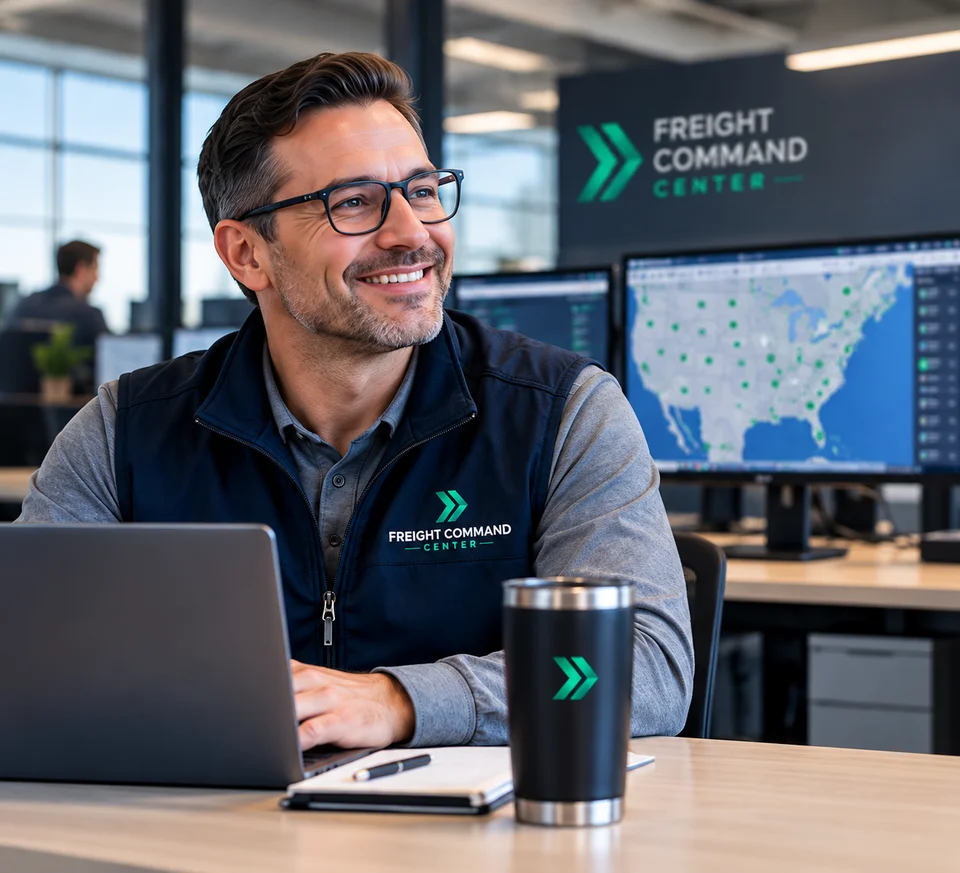
Freight Command Center is the service. Robo Load Builder is the AI-driven app working behind your shipment from quote to delivery.
There is no software for you to learn. You send us the freight, and Robo works behind the scenes organizing the details, researching the lane, preparing the load, helping manage carrier activity, watching the shipment, and keeping the next step in front of us.
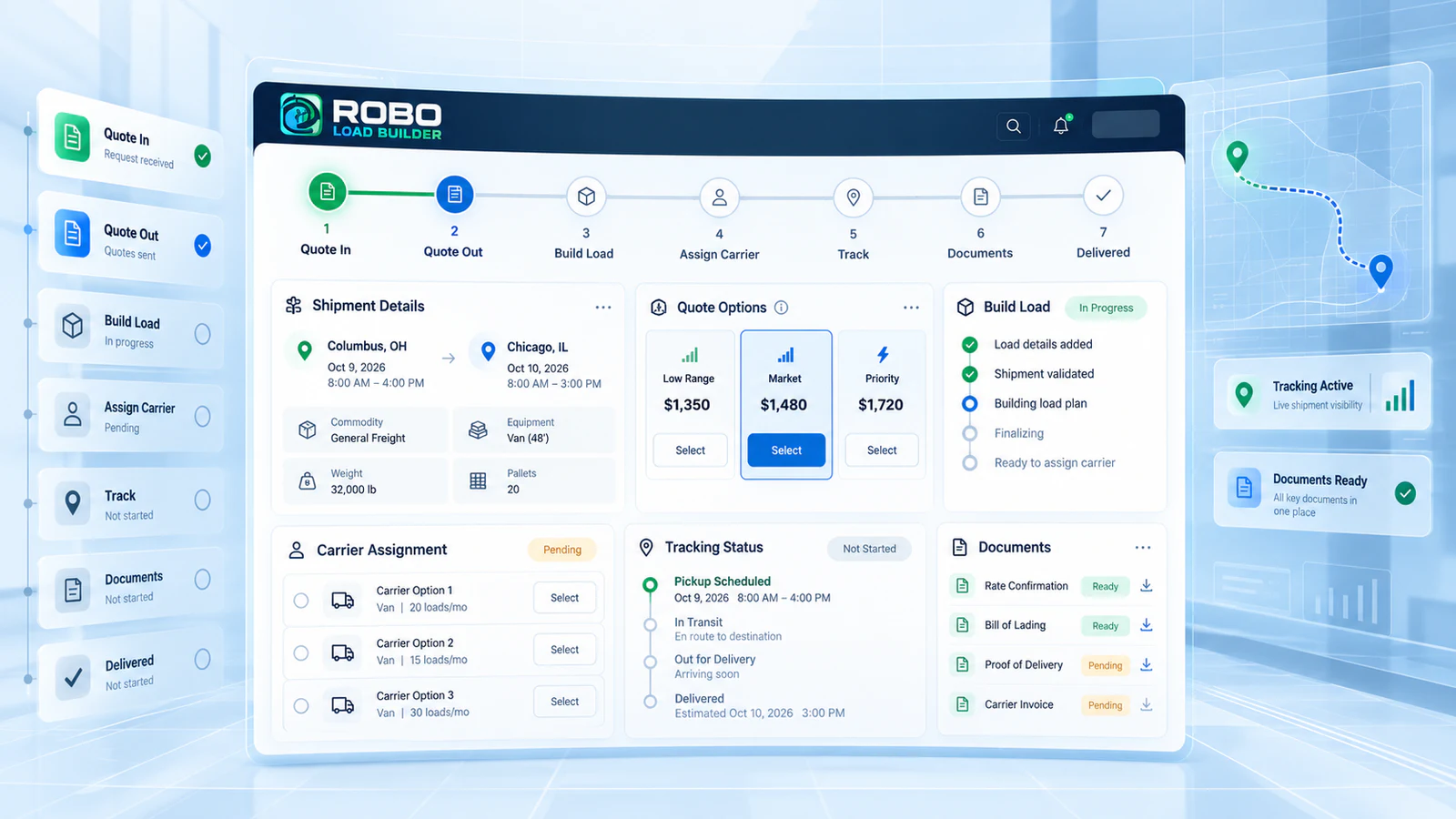
No new system for you to manage. Freight Command Center remains your point of contact.
ONE LOAD · START TO FINISH
From your first email to your final POD, Robo stays with the load.
A freight shipment should not have to be rebuilt every time it moves to the next stage.
Robo creates one working load record and carries the important information forward—from the quote request to pricing, approval, carrier outreach, tracking, delivery, and closeout.
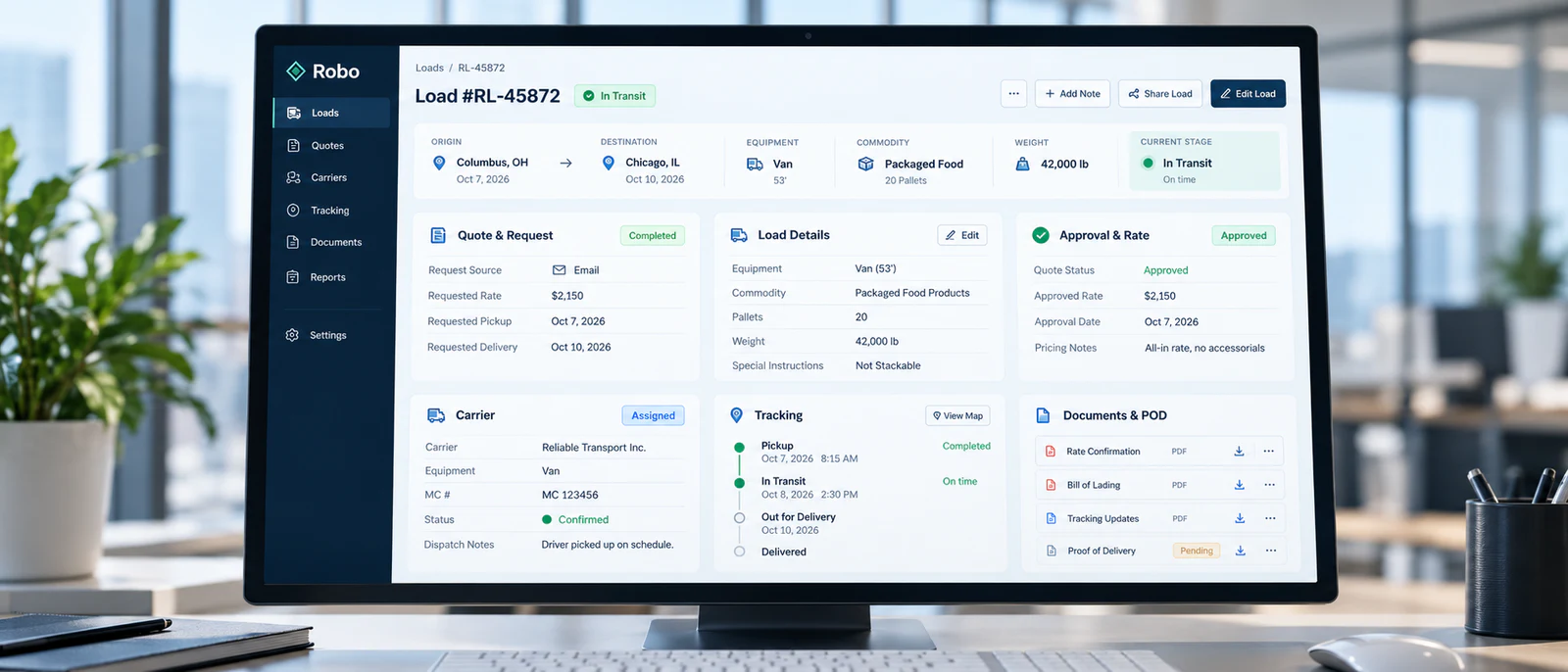
- 01Quote Request
- 02Quote Intelligence
- 03Approval
- 04Carrier Outreach
- 05Tracking
- 06Delivery
- 07POD / Closeout
BUILT AROUND WHAT SHIPPERS ASK FOR
Who is Robo for?
It’s for shippers who want to know what is possible—and know it is.
The shipper who wants more than just a quote price.
With AI at the heart of Robo, you get more information about your lane before making a decision. Robo can show low-to-high market pricing, historical rate data and trends, estimated placement timing, weather conditions, route issues, mileage, equipment options, and fast booking-reply choices. You are not just getting a number. You are getting information behind the number.
The shipper who wants their broker organized and truly on top of the load.
Think of Robo as your extra set of eyes behind every shipment. He checks the details, catches what may be missing, keeps everything together, and makes sure the load is ready to move when you approve it. No rebuilding. No unnecessary delays. No wondering whether something was missed.
The shipper who wants the load built fast and accurately.
Robo already has the shipment organized and checked before carrier outreach begins. Once approved, the information can continue into the carrier workflow without a broker manually rebuilding the shipment from scratch. Robo is already in the driver’s seat, making sure the load is ready to go—and that puts the customer in a better position from the start.
The shipper who wants AI negotiation skills working behind the load.
Carrier outreach can create a flood of emails, callbacks, rates, MC numbers, and follow-ups. Robo keeps the activity tied to the correct shipment, keeps carrier information together, supports vetting, and can use AI-assisted responses and negotiation context to help keep the conversations moving. This is for the shipper who cares about what happens behind the scenes—because that operational chaos can affect how quickly and how well a load gets covered.
The shipper who wants real attention from pickup to delivery.
Robo stays behind the shipment after the carrier is booked. Tracking, updates, common exceptions, prepared response workflows, and next actions stay connected around the load. Think of him as another set of eyes watching the shipment while Freight Command Center stays responsible for the service.
The shipper who wants the load closed out correctly and nothing left hanging.
Robo stays with the shipment through delivery, ETA follow-up, POD collection, documents, and closeout. This is for the shipper who cares about the details at the end just as much as the details at the beginning.


QUOTE REQUEST → WORKING LOAD
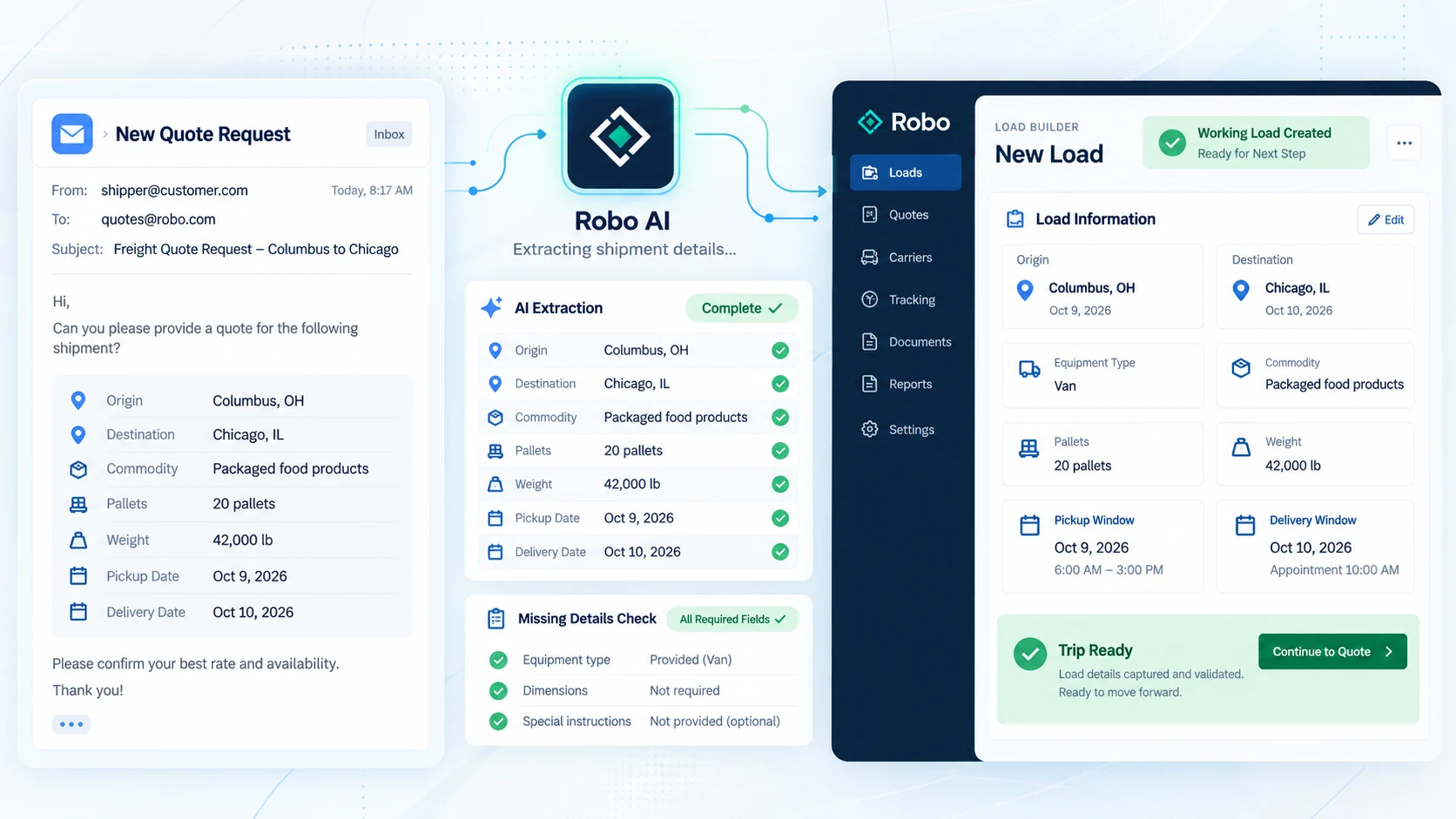
1. The first step might sound easy—and it is.
You send the quote, and Robo takes over.
It automatically creates the working load record, checks for missing details, and enters your shipment information once—not over and over again at every stage.
Think of Robo as an extra set of eyes behind the shipment. He checks the details, catches what may be missing, keeps everything together, and gets the load ready for what comes next.
- Less retyping
- Fewer missed details
- One connected load record
- Ready for the next step
QUOTE INTELLIGENCE
2. We give you the market, not just a number.
Have you ever received a freight quote and wondered:
“How did they come up with that number?”
Not anymore.
Behind what may look like a simple shipment, Robo can bring together market data, historical lane information, shipment requirements, equipment options, route information, weather, and other context so the quote gives the customer something useful to evaluate.
HAVE YOU EVER WISHED…
- 1
…you could choose between price and placement speed?
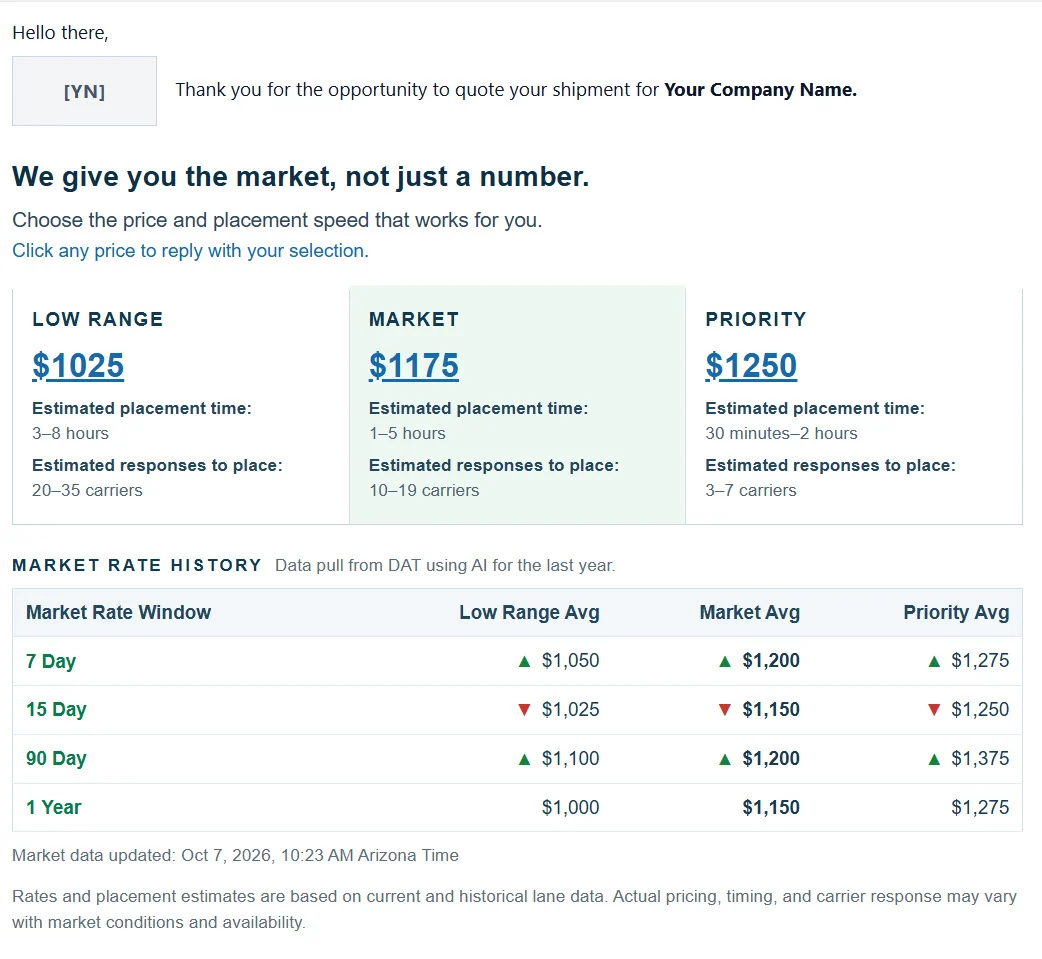
Now you can. Every quote gives you three market positions—Low Range, Market, and Priority—each with its own price, Estimated placement time, and Estimated responses to place. You choose the price and placement speed that works for you.
- 2
…you could see the market behind the price?
Now you can. Robo shows you current and historical lane rates through the Market Rate Window, from recent market activity to as much as one year of lane history. You can see the low-to-high market range, recent averages, and pricing trends behind the quote.
- 3
…you could see exactly what information your quote was built from?
Now you can. Robo confirms the shipment details used to build your quote—including origin, destination, commodity, weight, units, pickup and delivery requirements, and equipment—so you can see exactly what we are working with before the load moves forward.
- 4
…you could see more of what may affect the lane before you book it?
Now you can. Your quote can include mileage, estimated drive time, pickup and delivery weather, route conditions, appointment information, and other lane details that may affect pricing, timing, or placement.
- 5
…you could see which equipment fits your freight before carrier outreach begins?
Now you can. Robo reviews the load details and recommends the truck type that best fits the shipment, while also showing alternate equipment options that may work. That gives you more context before the load ever reaches the carrier market.
APPROVAL → CARRIER MARKET
3. Approval should mean go.
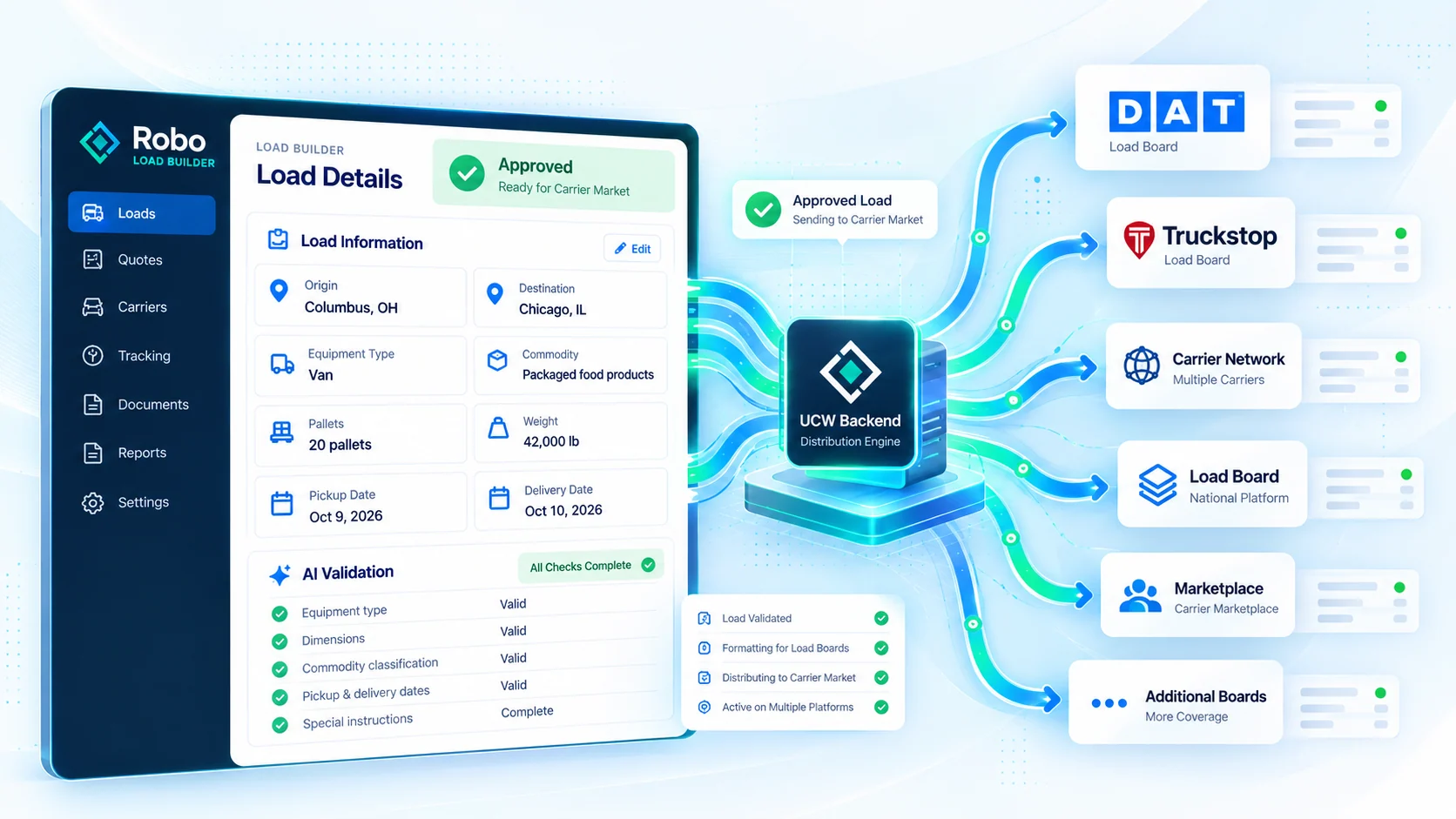
Once you approve your shipment, Robo already has the details organized, checked, and ready for the next step.
Whether your load has one stop or three, Robo carries the pickup and delivery information, appointments, equipment, weight, commodity, special instructions, and other requirements forward without someone having to rebuild the load by hand.
Then, with one click, the load can move into UCW’s backend and be prepared for distribution across up to 14 load boards.
Once you approve the quote, Robo is already set up to know what comes next.
CARRIER OUTREACH
4. This is where carrier outreach can get messy. Robo was built for the mess.
Once a load is posted, calls, emails, callbacks, carrier replies, quotes, MC numbers, phone numbers, and follow-ups can start coming from every direction—especially when several loads are moving at once.
Not with Robo.
Robo keeps carrier activity tied to the correct load. He can keep the important carrier information together.
Where the implemented workflow supports it, Robo can continue carrier conversations through multiple replies while keeping the target price and prior conversation context available.
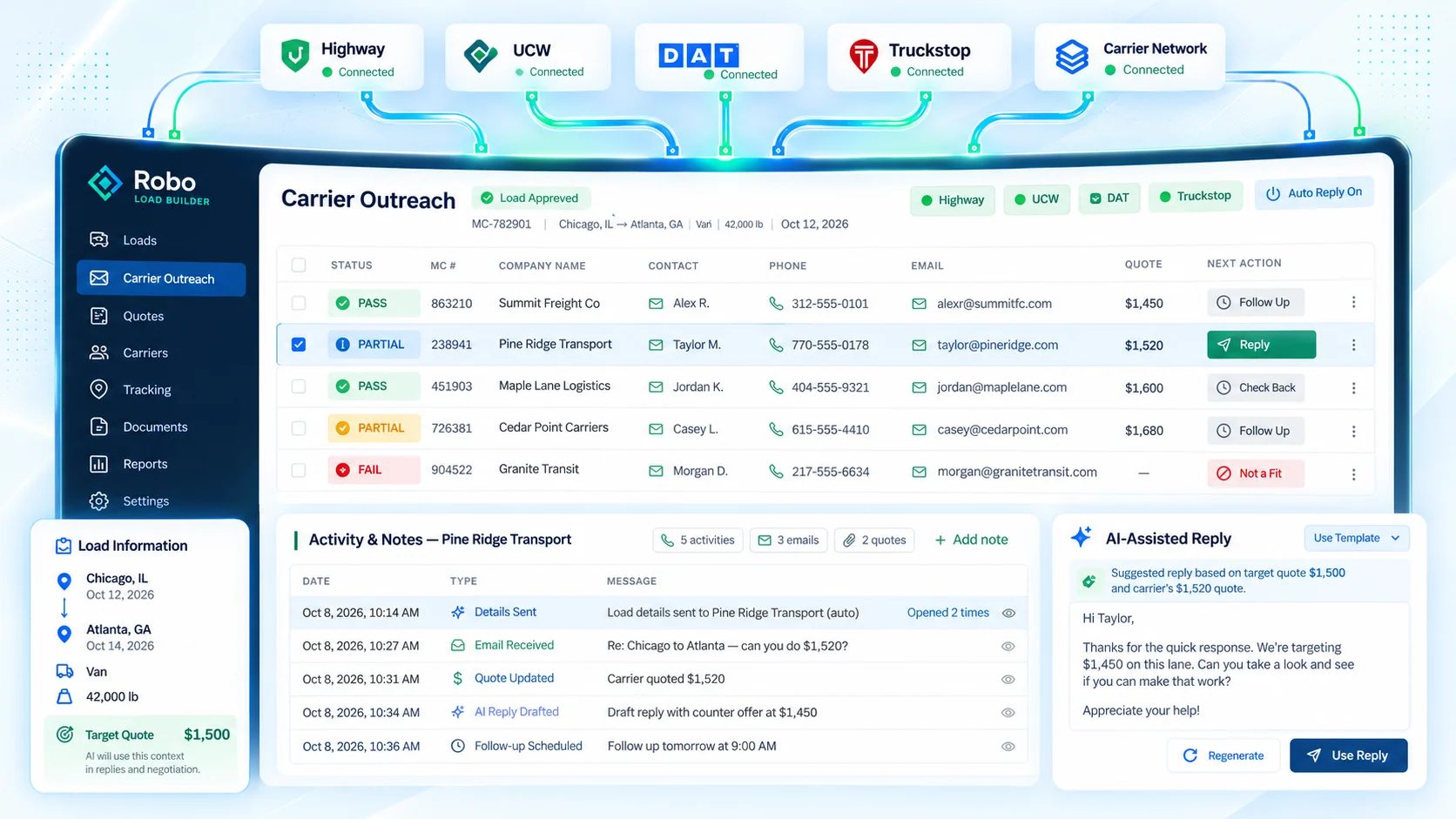
Robo helps organize, respond, compare, and vet. Freight Command Center makes the carrier decision.
Instead of your broker scrambling between inboxes, notes, calls, and scratch paper, Robo is quietly organizing the activity behind the scenes. He has been with the load since the quote came in, so when carrier outreach begins, the shipment does not start over.
TRACKING + SITUATION RESPONSE
5. Tracking is only part of the job. Robo is situation ready.
Once a load is covered, Robo is set up to send you the Trucker Tools tracking system so your shipment stays visible from pickup through delivery.
- A truck can be late.
- A pickup can slip.
- A delivery can move.
- A driver can break down.
- Detention can happen.
- An update can be missed.
Robo is built so the next response does not have to be invented in the middle of the problem.
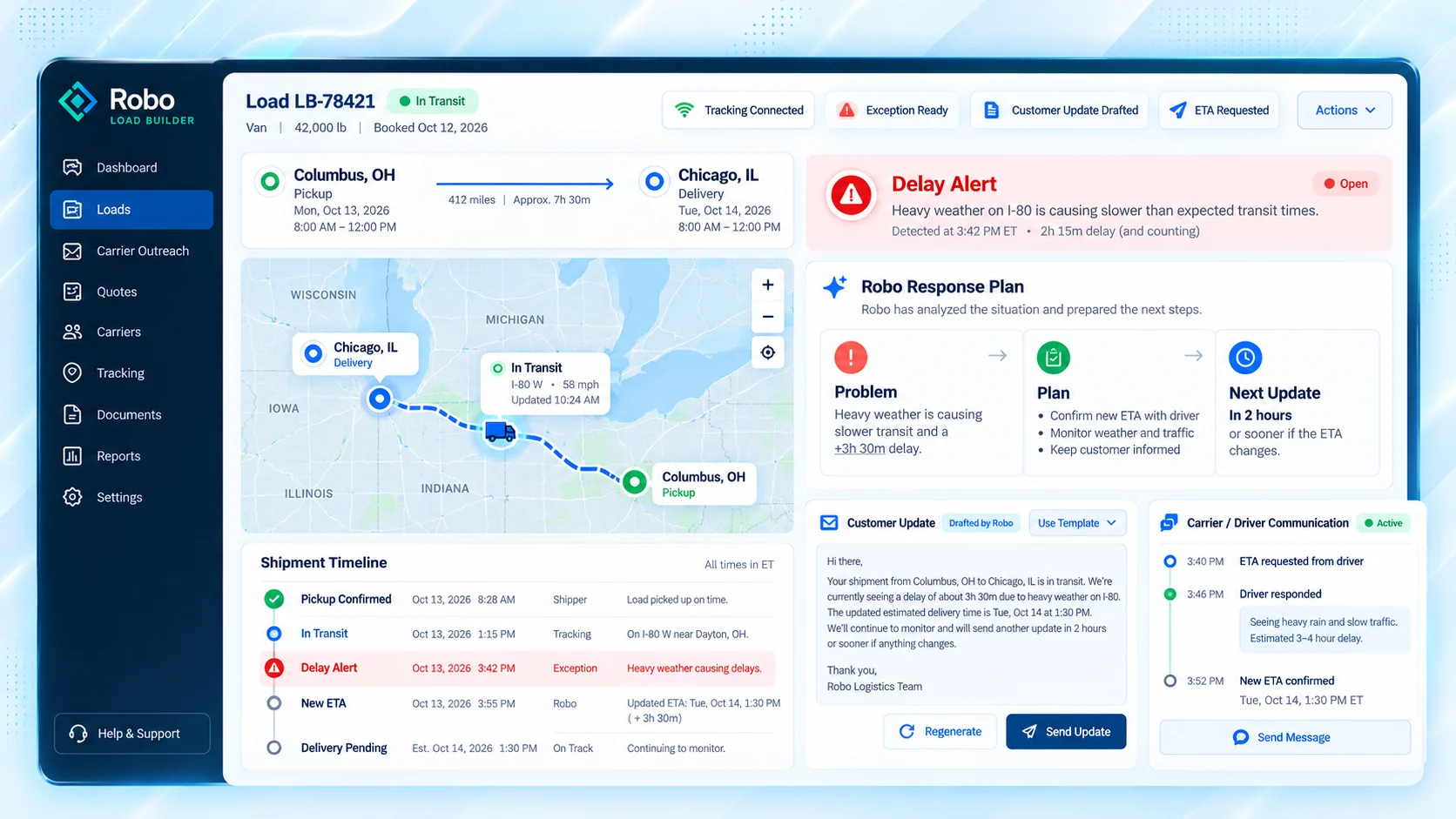
He keeps the load, the communication, and the next action connected so Freight Command Center can respond faster and keep you informed.
DELIVERY → CLOSEOUT
6. Delivery is not the end. The load still has to be closed out correctly.
Robo stays with the shipment through the final steps.
If a truck is running late, the workflow knows an ETA needs attention.
When the load is delivered, Robo knows the POD needs to be collected, connected to the load, and made available for the customer.
Where implemented, the workflow can also use driver text communication to help request updates and documents quickly.
Robo is still watching, still following up, and still making sure the shipment gets finished the right way.
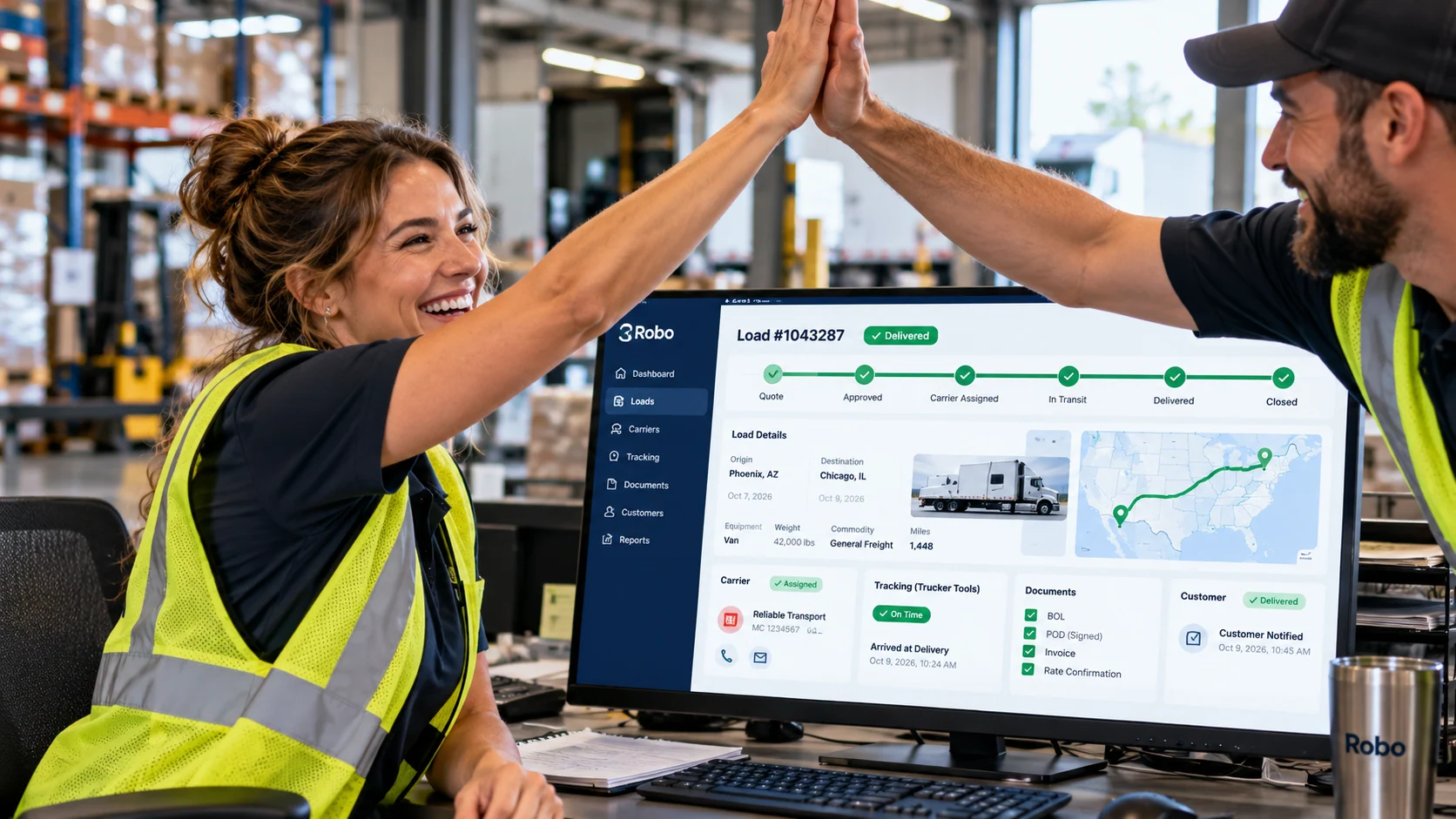
- Delivery status
- ETA follow-up
- POD request
- Signed document attached to load
- Customer follow-through
- Closeout visibility
You decide—what do you want from your freight service?
Does Robo sound like someone you would want working behind your shipments?
If you want better information, faster response, more organization, and another set of eyes watching the details from quote to delivery, then Robo may be exactly what you have been looking for.
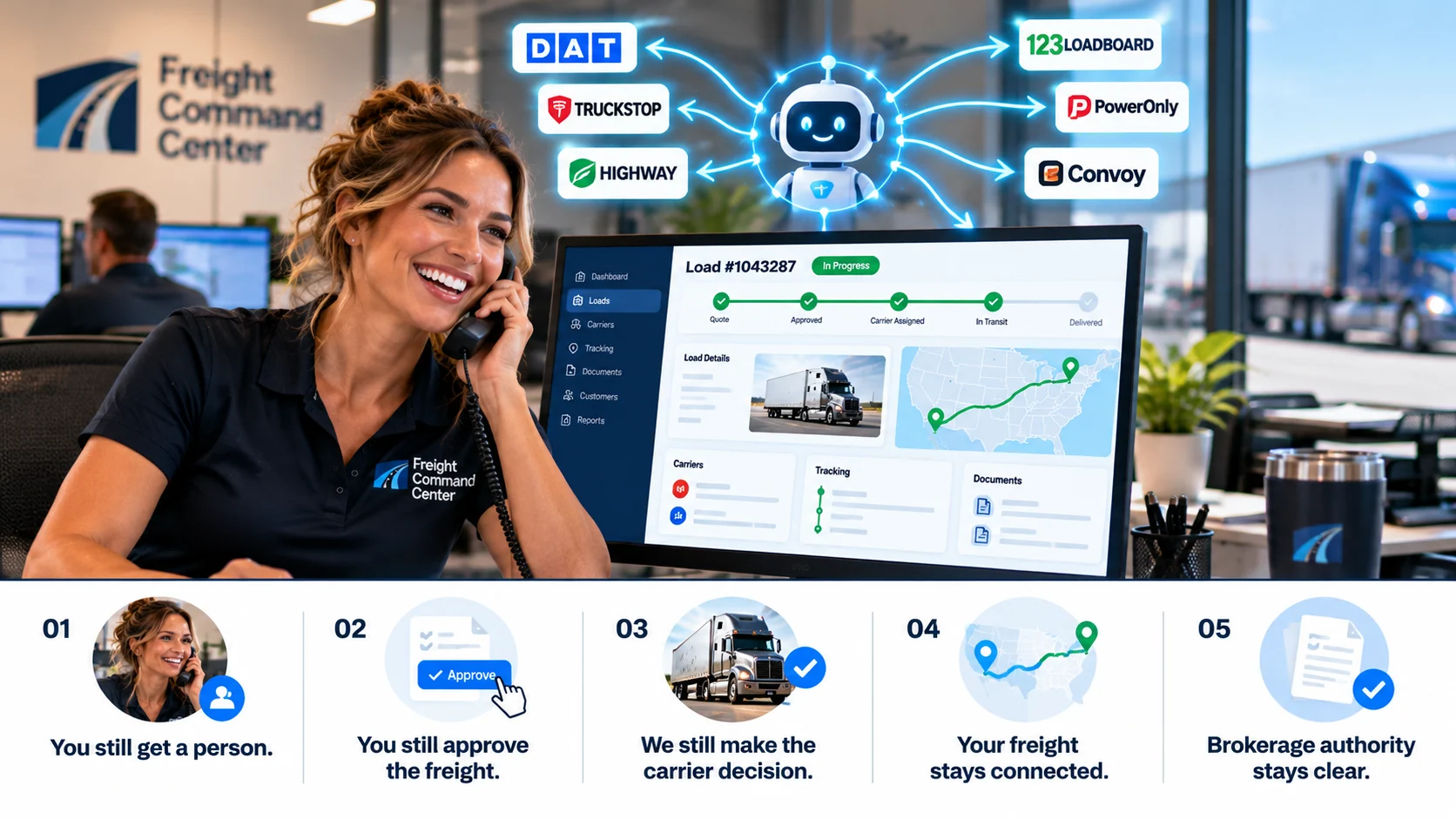
THE SERVICE STAYS PERSONAL
Better technology should make the service better—not make you manage more software.
You still get a person
Freight Command Center remains the customer-facing service.
You still approve the freight
A quote request is not a booking. The shipment moves after customer approval.
We still make the carrier decision
Robo helps organize data, responses, rates, and vetting. Freight Command Center makes the carrier decision.
Your freight stays connected
The shipment record, carrier activity, tracking, communication, and documents stay tied together through completion.
Brokerage authority stays clear
Freight brokerage services are provided through UCW Logistics.
Freight brokerage services are provided through UCW Logistics · MC 841454 · USDOT 2444076.
PUT ROBO TO WORK BEHIND YOUR NEXT SHIPMENT
See what your freight quote can look like when it comes back with more than a number.
Send us the shipment details you have.
Robo helps organize the load, research the lane, prepare the quote, and keep the information moving forward. Freight Command Center reviews the shipment, communicates with you, and manages the freight.
You build the shipment. We help handle what comes next.